Systemic Compliance (Prong 2)
Systemic Compliance – (Prong 2)
The next step of the process is to show systemic compliance. Prong 2 (A) will open in the application for the LEA once Prong 1 is completed. GaDOE provides LEAs with comprehensive technical assistance and professional learning on compliant transition planning during the Prong 1 and 2 process.
Screenshot of Prong 2 Tab

LEAs must demonstrate systemic compliance through submission of additional transition plans.
- GaDOE will select five (5) additional transition plans for review and notify the LEA of the student names through the Secondary Transition application.
- The LEA reviews and makes any necessary corrections to the additional transition plans following due process procedures prior to submitting in the application.
- The LEA will upload the additional plans for GaDOE to review and verify systemic compliance through the Secondary Transition
Select the icon under Upload/Review Documents (B) to upload transition planning documents for the students selected.
Screenshot of Available Student File

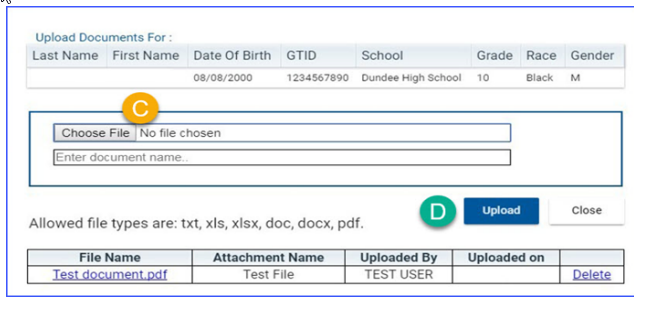
To select documents, select Choose File (C) and navigate to the document on your computer. Enter the document name and select Upload (D). The document (s) will not upload until you enter a name for the document.
Screenshot of Uploading Transition Plans
Once the documents for all students are uploaded and submitted, the status changes to Verification. When the uploaded documents are accepted and the review is completed by GaDOE staff, the status of a student changes to Compliant or Noncompliant.
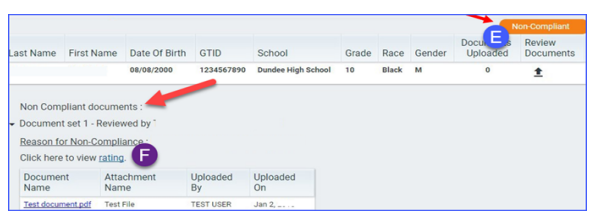
If a student’s transition plan is Noncompliant (E), the LEA will be required to correct and upload/submit another set of documents for the student. The reason for Noncompliance is available under Noncompliant documents. The rating for the student can be seen by clicking on the rating link (F).
Screenshot of a Noncompliant Plan
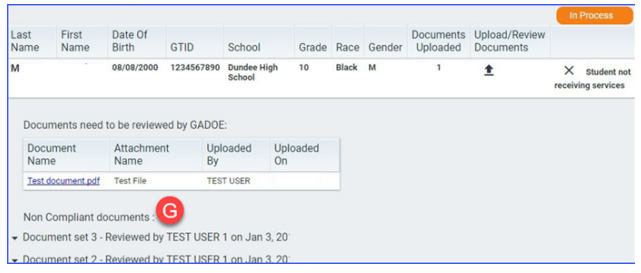
The history of noncompliant documents is available for viewing (G).
Screenshot of Noncompliant Documents
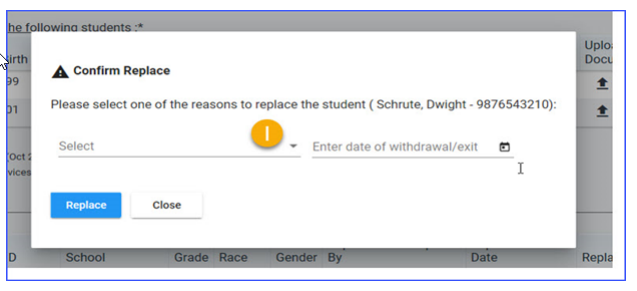
If a student on your list has withdrawn or exited special education, click on Student not receiving services (H) and a pop-up screen will appear (I). Enter the reason to replace the student and the withdrawal/exit date.
Screenshot of Student Not Receiving Services

Screenshot of Confirming Student Replacement
Select one of the options available from the drop down box (J).
Screenshot of Reason to Replace Student
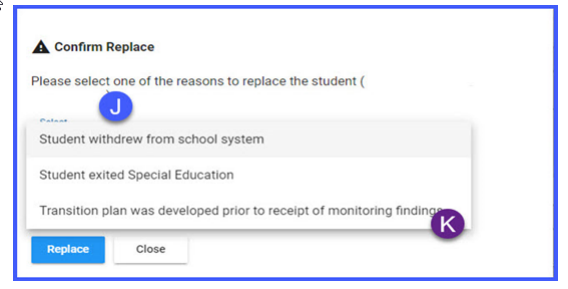
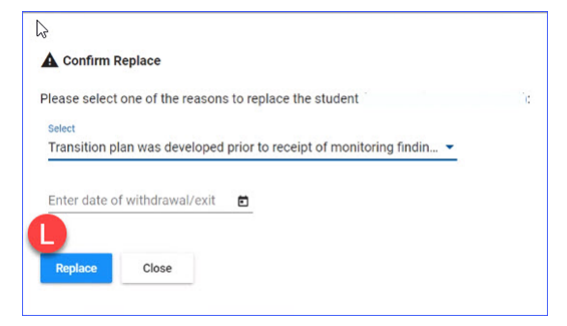
Note: If the Transition Plan for the selected student was completed prior to the LEA’s receipt of a finding of noncompliance, the student selected will need to be replaced and this reason should be selected (K). When this reason is selected, it will also prompt you to enter a date of withdrawal/exit. Select the Replace button (L). A new student's name will be selected and should appear in the application.
Screenshot of Replacing Student
When a student is withdrawn, the status changes and the reason for the withdrawal is shown below (M).
Screenshot of Withdrawn Student

The status is changed when withdrawal is acknowledged by GaDOE (N).
Screenshot of Withdrawal Acknowledged

A success message is shown when all students are compliant.
LEAs will receive a clearance letter of compliance through the SE Dashboard when all selected plans have been cleared.
GaDOE Support
If you have questions regarding the Transition Planning process, please contact Paula Gibson at pgibson@doe.k12.ga.us.
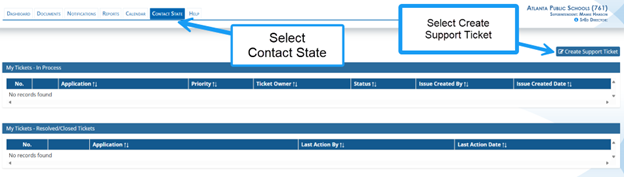
If you have questions regarding data entry in the Transition Planning Survey, please submit a ticket in the SE application in the Contact State tab. GaDOE staff will review the ticket and respond in the ticket application.
LEAs may also reach out to the GO-IEP Data Team or Dominique Donaldson at dominique.donaldson@doe.k12.ga.us or Carol Sprague at carol.sprague@doe.k12.ga.us for support with submitting data in the application.