Completing a Withdrawn Student
Completing a Withdrawn Student
Eligibility and IEP delay explanations are also required for students who withdrew from the LEA.
|
While he/she was present in the LEA, what prevented the evaluation from being completed? |
Prior to entering the information into the application, investigate the situation to provide accurate information.
Entering Data: Withdrawn Student
Screenshot of Withdrawn Eligibility Student
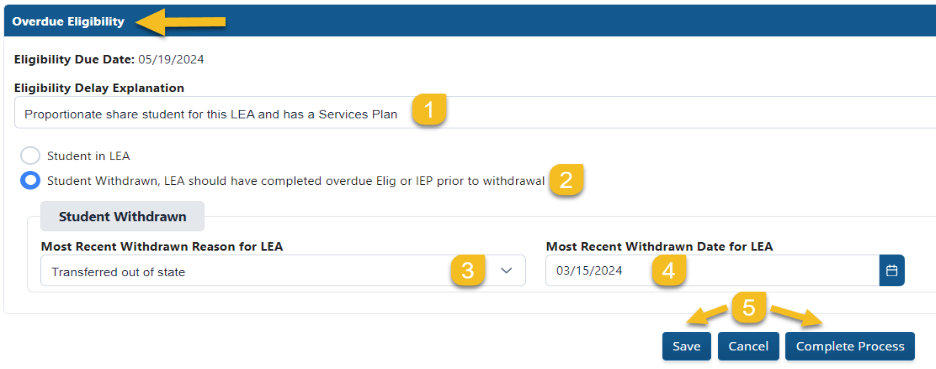
Steps for Completing a Withdrawn IEP Student
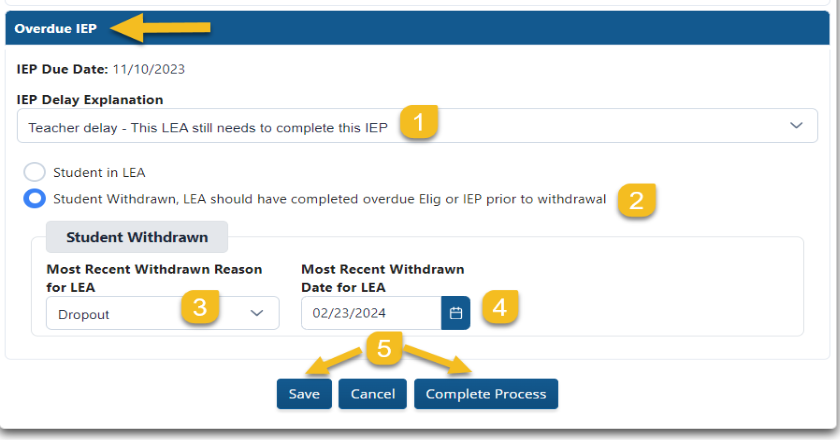
Steps for Withdrawn Student
Step 1: Select the Eligibility or IEP Delay Explanation (see Eligibility or IEP Delay Explanations above). This is the reason the Eligibility or IEP was not completed while the student was in the LEA.
Step 2: Select “Student Withdrawn”; LEA should have completed overdue Eligibility or IEP prior to withdrawal.”
Step 3: Enter the “Most Recent Withdrawn Reason for the LEA”. It should match the SIS. (See the Withdrawn Reasons in the chart below.)
Step 4: Enter the “Most Recent Withdrawn Date for the LEA”. Refer to your SIS to obtain this date.
Step 5: Select “Save” if you plan to come back to the file if an additional response is needed or select “Complete Process” if the process for this student is finished and ready for submission. (Note: The LEA will not be able to make changes once “Complete Process” has been selected.
Withdrawal Reasons
|
High School Graduation |
Transferred to a Department of Defense school |
|
|
Court or Legal |
SB10 Transferred to Private School |
Transferred to another school in another system |
|
Death |
SB10 Transferred to Public School |
Transferred to private school |
|
Displaced due to a natural disaster |
SB 10 Transferred to State Schools |
Transferred/under Jurisdiction of DJJ |
|
Dropout |
Transferred out of country
|
Withdrew to TCGS Dual Achieve Program |
|
Not subject to compulsory attendance |
Transferred out of state
|
|