Completing Overdue IEPs
IEP Delay Explanations with Definitions
|
Definition |
|
|
Teacher Delay - This LEA still needs to complete this IEP. |
No IEP meeting has been held. At the time of SR signoff, the IEP was overdue due to teacher delay. |
|
IEP was due and should have been completed prior to a finding of not eligible. (Process has been completed.) |
The IEP became overdue before the student was found ineligible. |
|
IEP was due and should have been completed prior to a revocation of consent for services. (Process has been completed.) |
Revocation occurred after the IEP was overdue. |
|
Student enrolled in this LEA already overdue. |
The IEP was overdue at SR sign-off in the prior year. This was in another LEA, but the student has now enrolled in your LEA, and the IEP is overdue. This exception if appropriate if your LEA completed a new IEP within 30 days. If the student was in your LEA for a longer period before a new IEP was completed, please select the reason for the delay in your LEA, such as Teacher Delay. |
|
Proportionate share student for this LEA and needs a Services Plan. |
The student is currently a homeschooled or private schooled student and served under a Services Plan, but a new Services Plan needs to be completed. |
|
IEP was completed on time but was not reported |
IEP was completed on time but not correctly reported in the prior year with the appropriate (SR) EVENT CODE ‘07’. |
|
Exit date was incorrectly reported causing the IEP to appear overdue at the time of the exit |
SR EVENT DATE for EVENT CODE ‘09’ or ‘10’ was incorrectly reported with a date after the IEP became overdue. |
|
Withdrawal date was incorrectly reported, causing the IEP to appear overdue at the time of the withdrawal. |
Student withdrew from the LEA before the IEP was due and earlier than reported in the prior year SR, causing the student to incorrectly appear to be overdue at the time of withdrawal. |
|
IEP was overdue and not completed prior to withdrawing. Student has not enrolled in another Ga LEA. (Process has been completed) |
IEP was overdue, but not completed, at the time the student withdrew from the LEA for any reason such as transferred to another LEA outside of GA or graduated. The LEA cannot complete the IEP now.
|
|
Students enrolled in LEA this year, and overdue IEP was completed in prior LEA but not documented in this application. |
Student enrolled in LEA this year, and overdue IEP was completed in prior LEA this year but not documented in this Overdue application. |
|
IEP was overdue and not completed prior to dismissal from special education. (Process has been completed.) |
The IEP was overdue and never completed prior to the dismissal from special education. |
|
Student was incorrectly reported in SR with enrollment but did not attend school for any day during the prior school year. (Process has been completed.) |
Student was reported with a line of enrollment when he/she was not actually enrolled or attending school for any day during the prior school year. This option can also be used if the GTID was claimed, but the student never enrolled. |
|
LEA did not realize this was a SWD in time to conduct an IEP meeting before the prior year ended. |
Student was enrolled in your LEA in the prior year, and the student was not served by the LEA. The LEA did not have an AR meeting before Student Record sign-off. |
|
Parent delayed the IEP meeting with multiple requests to reschedule. |
LEA has documentation to show multiple attempts to meet were offered prior to the IEP being overdue, and the team continued to reschedule to meet the parents’ needs. Use this option only if the original meeting was scheduled at least 2 weeks before the due date. |
Entering Data: Overdue IEP
Before entering responses in the application: Research the reasons that led to the IEP being overdue.
- The required information can be completed in multiple sessions.
- The application is dynamic and adjusts to the responses selected. The upload requirement depends on the delay explanation selected.
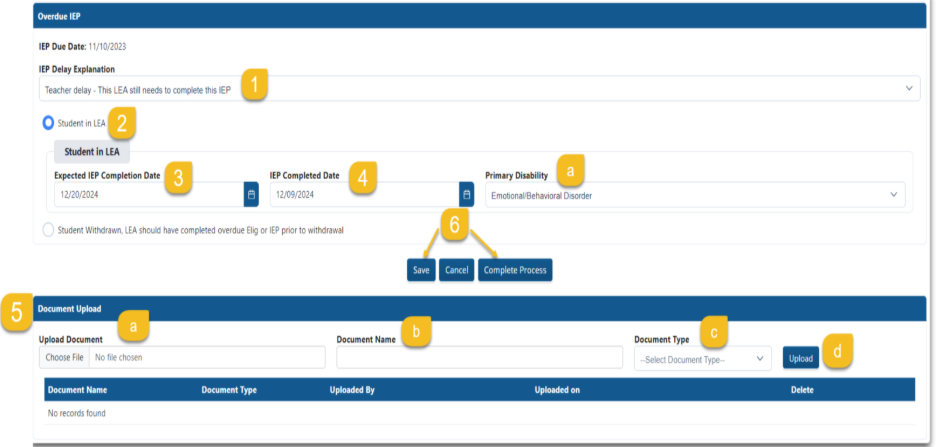
IEP is complete, and the student is enrolled in your LEA.
Step 1: Select the “IEP Delay Explanation” (see IEP Delay Explanations above). This is the reason the IEP was not completed on time.
Step 2: Select the current enrollment status.
“Student in LEA” Or
“Student Withdrawn; LEA should have completed overdue Elig. or IEP prior to withdrawal.” Steps for a Withdrawn Student are below.
Step 3: Enter the “Expected IEP Completion Date”.
Stop here and select “Save” if the IEP has not been completed. Return to this file in the application as soon as it has been completed to finish Steps 4, 5 and 6.
If the IEP has been completed, continue to Step 4.
Step 4: Enter the “IEP Completed Date” (if completed)
- Select “Primary Disability” from the drop down.
Step 5: Upload completed/finalized IEP.
- Select “Choose File” and locate the completed IEP.
- Name the Document selected.
- Select “IEP” for Document type.
- Select “Upload.”
- If the wrong file has been uploaded, select the red trash can and start over with Step 5.
Step 6: Select “Save” if you plan to come back to the file if an additional response is needed or select “Complete Process” if the process for this student is finished and ready for submission.
Step 7: Audits will remind you of any fields that are not completed.
Step 8: Continue the same process until all students are completed.
If the IEP is not complete and the student is enrolled in your LEA,
Step 3: Enter the “Expected IEP Completion Date.”
Step 4: Select “Save”.
- Return to this file once the IEP has been completed and start at Step 4.