Post School Process (Large LEAs)
Directions for Reporting Post-School Outcomes
by Exporting and Uploading an Excel File
(Optional, not recommended for smaller districts)
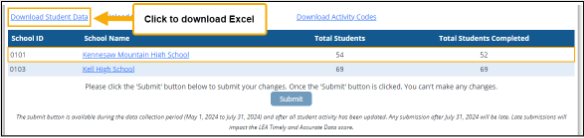
Once you enter the application, select “Download Student Data.”
Example of Download Student Data link in the Post-School Outcome application
Save Export
Save the exported file as an Excel Workbook file (file extension is xls). You must save the file before opening. Do NOT change the file or sheet name. Changing the name will prevent you from uploading the completed file.
Enter Post-School Activity
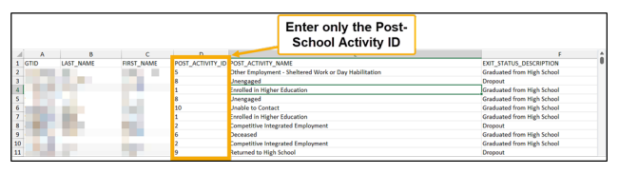
The excel file will include any data completed online. Enter only the Post-School Activity ID code (Listed below). It is not required that the Post-School Activity Name be entered.
Post-School Activity Codes
Codes to be used for the LEAs submitting Post-School Activities using an Excel file. Please refer to the detailed directions and definitions of each Post-School Activity. The code numbers below are to be entered into the Excel file, NOT the full phrase for each activity. After entering the Activity ID codes into the Excel file, do not change the name of the file before you upload it. If you change the name of the file or enter the full phrase for each activity, you will not be able to submit your data.
|
Activity ID Codes |
Post-School Activity Name |
|
1 |
Enrolled in High Education |
|
2 |
Competitive Employment |
|
3 |
Enrolled in Other Post-secondary Education or Training |
|
4 |
Other Employment-Part-Time, Self-Supported Employment |
|
5 |
Other Employment-Sheltered Work or Day Habilitation |
|
6 |
Deceased |
|
7 |
On Waiting List |
|
8 |
Unengaged |
|
9 |
Returned to High School |
|
10 |
Unable to Contact |
|
11 |
Student had special education Exit EVENT CODE ‘09’, 10’ or ‘13’ prior to exiting the LEA |
Screenshot of an Excel file using the Post-School Activity ID code
Save Post-School Activity
When you have entered the activity ID codes, select “SAVE” and save it as an Excel workbook file with the original name. 
Upload Survey
Select “Upload Student Data with Activity Information.” (1) Choose file and upload the appropriately saved file.
Screenshot of the Excel file upload location 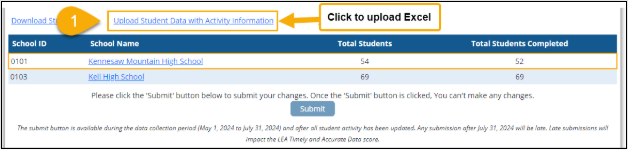
Screenshot of Upload File
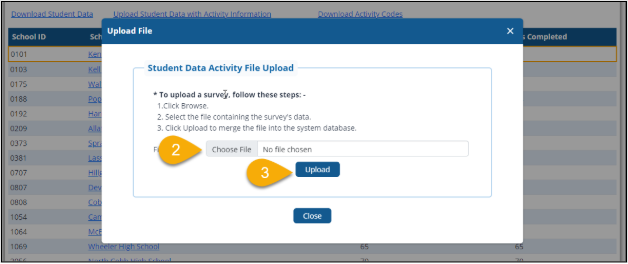
Select choose file (2) from your computer. Select “Upload” (3).