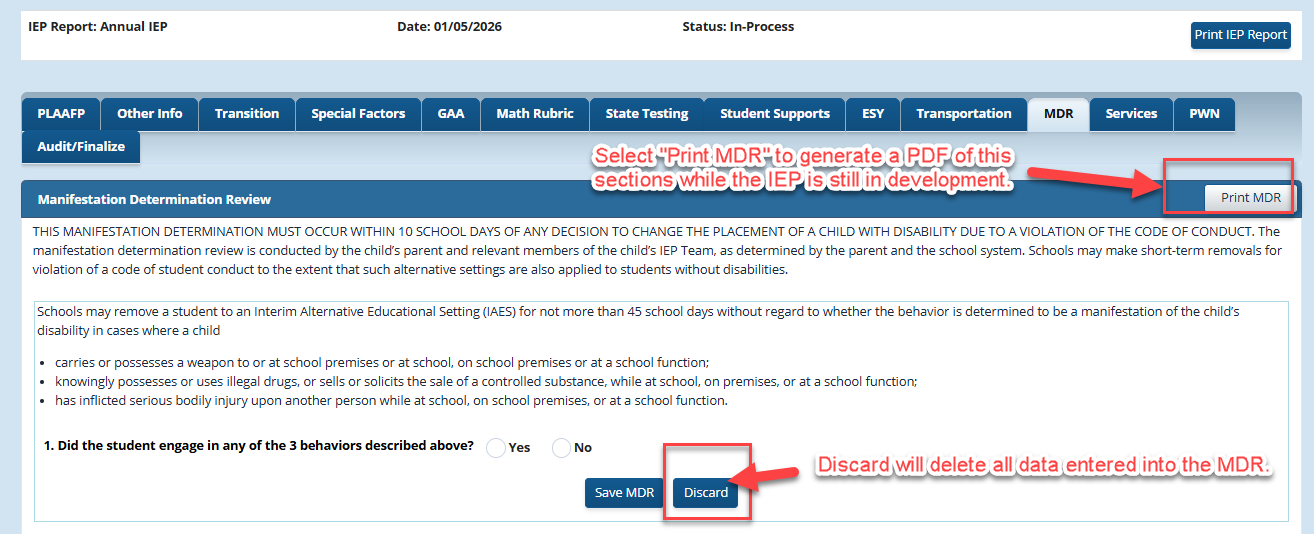
Manifestation Determination Review
To access the MDR tab, the student's active case must have a meeting notice in an Annual Review IEP and IEP with Manifestation Determination Review added as meeting purpose.
**If a meeting notice has been started that did not include MDR as a meeting purpose, reschedule the meeting notice (due to errors in the meeting notice) and ADD MDR as a meeting purpose.
Once the IEP meeting notice is created and the IEP is in development, select the MDR tab to access the document in GO-IEP.
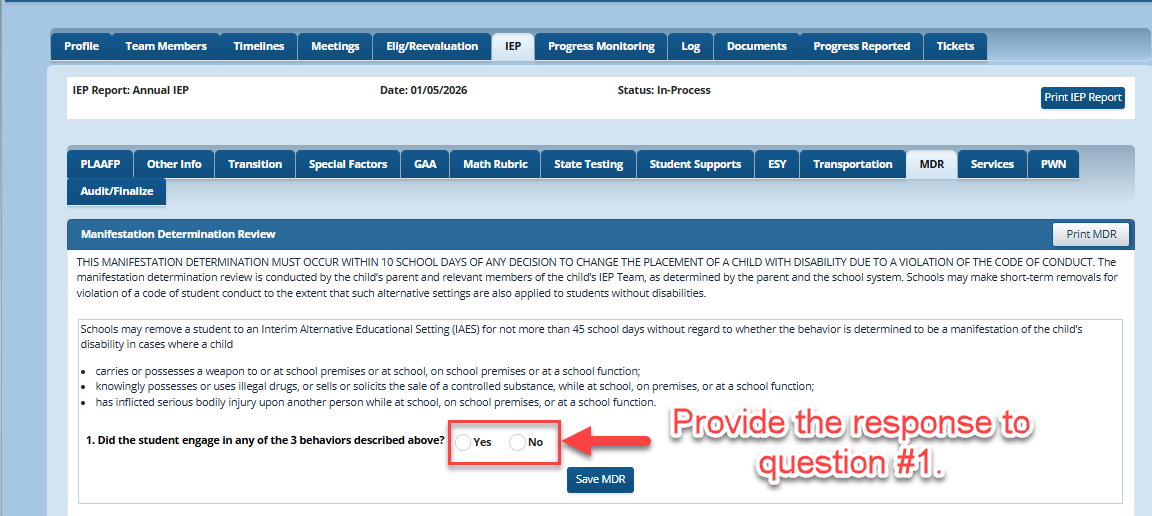
1. Manifestation Determination Review
The IEP team should provide a response ("Yes" or "No") for question #1: " Did the student engage in any of the 3 behaviors described above?".
Once the user has provided the response to the question, then click "Save MDR".
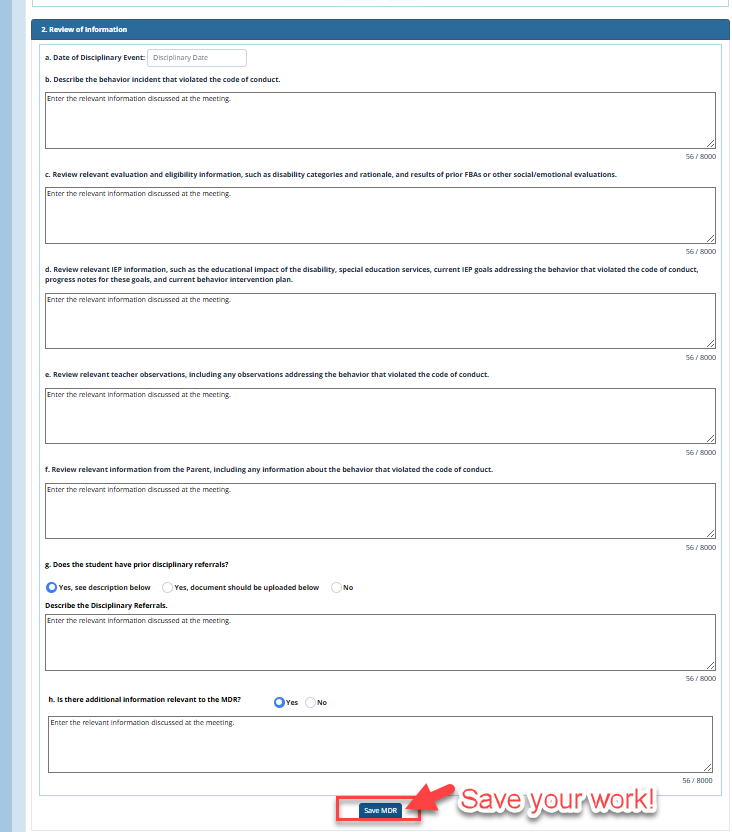
2. Review of Information
Enter the relevant information discussed by the Team for all questions (a) - (h).
- (a) Enter the date if the disciplinary event.
- (b) Describe the behavior incident that violated the code of conduct.
- (c) Review relevant evaluation and eligibility information, such as disability categories and rationale, and results of prior FBAs or other social/emotional evaluations.
- (d) Review relevant IEP information, such as the educational impact of the disability, special education services, current IEP goals addressing the behavior that violated the code of conduct, progress notes for these goals, and current behavior intervention plan.
- (e) Review relevant teacher observations, including any observations addressing the behavior that violated the code of conduct.
- (f) Review relevant information from the Parent, including any information about the behavior that violated the code of conduct.
- (g) Does the student have prior disciplinary referrals? (see Scenarios 1- 3 below)
- (h) Is there additional information relevant to the MDR? If the answer is "yes" an additional text box will populate for the team to add the additional information.
Once all responses are entered for parts (a) - (h), Click "Save MDR" to keep your responses.
Scenario 1:
If the response for question (g) is "Yes, see description below" an additional text box will show for the Team to add information.

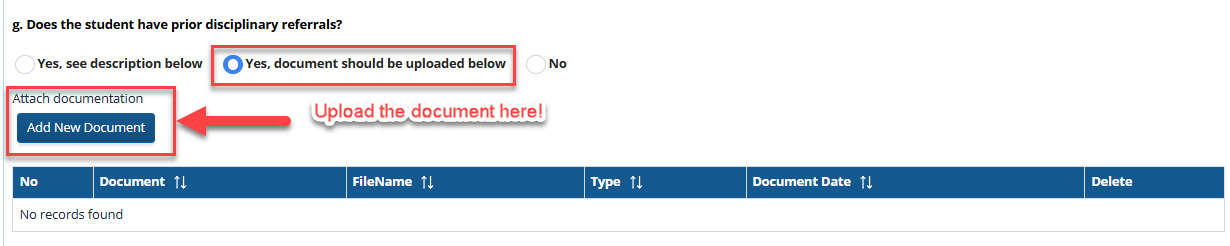
Scenario 2:
If the response question (g) is " Yes, document should be uploaded below", the user should upload the document into the MDR using the Add New Document upload button.
Scenario 3:
If the response for question (g) is "No", then no additional information is needed from the Team for this question and the user should move on to question (h).

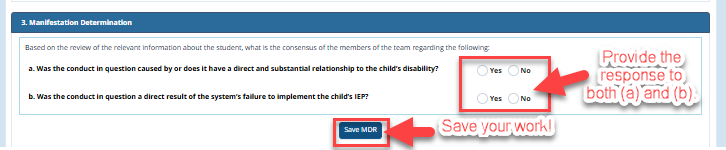
3. Manifestation Determination
A response is required to two questions, "Based on the review of the relevant information about the student, what is the consensus of the members of the team regarding the following:"
Provide the appropriate response to these two questions:
a. Was the conduct in question caused by or does it have a direct and substantial relationship to the child’s disability?
b. Was the conduct in question a direct result of the system’s failure to implement the child’s IEP?
If the response is "Yes" to either (or both) of the questions (a) or (b), then the conduct IS a manifestation of the child’s disability and the child must be returned to the placement from which he was removed, unless
(1) the incident involves weapons or drug possession or infliction of serious bodily injury; or
(2) the parent and the district agree to a change of placement as part of the modification of the student’s behavioral intervention plan.
If both questions (a) and (b) in this section are "No", GO-IEP will show:
"This behavior is not a manifestation of the disability. The relevant disciplinary procedures applicable to children without disabilities may be applied in the same manner to the child with a disability. The school system's FAPE obligations continue when the resulting change of placement exceeds 10 school days, except that FAPE may be provided in an interim alternative educational setting. The FAPE-related services must enable the child to continue to participate in the general education curriculum, although in another setting, and to progress toward meeting the goals set out in the child's IEP. If the behavior was not a manifestation of the disability, the need for a functional behavioral assessment and a behavioral intervention plan should be considered to prevent the behavior from recurring."
4. FBA:
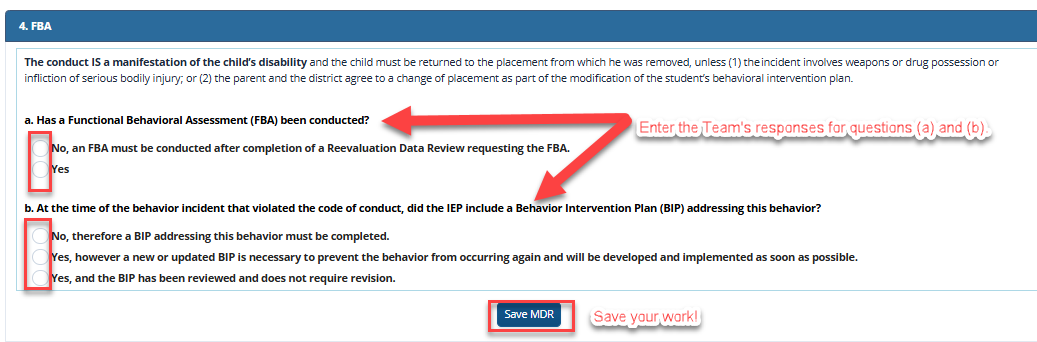
Provide a response to questions (a) and (b) in this section.
Scenario 1:
If the conduct is a manifestation of the child's disability, response to question (a) is "No", move on to question (b) and provide the Team's response.
If question (a) is No, complete question (b).
If question (a) is Yes, answer the additional questions and then move on the question (b)
Scenario 2:
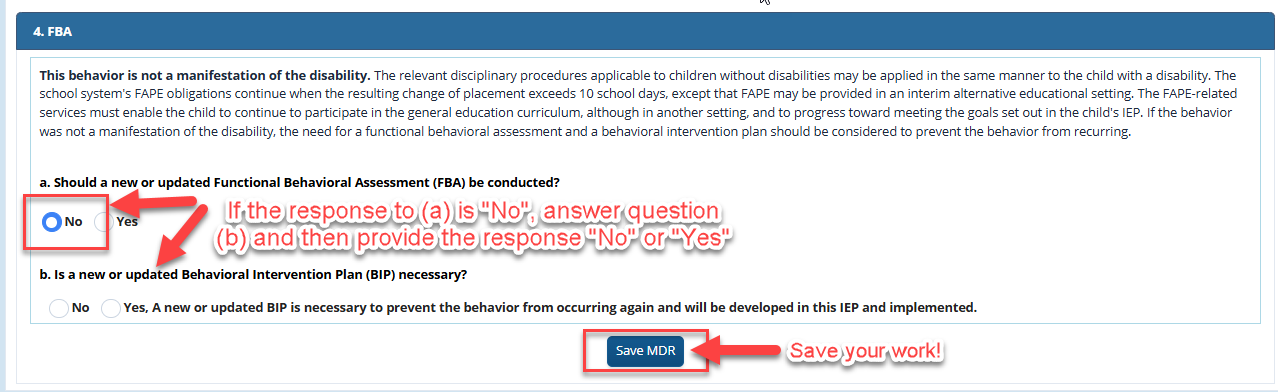
If the behavior is not a manifestation of the disability, answer questions (a) and (b) as discussed by the IEP Team.
If the response to question (a) is "No", answer question (b).
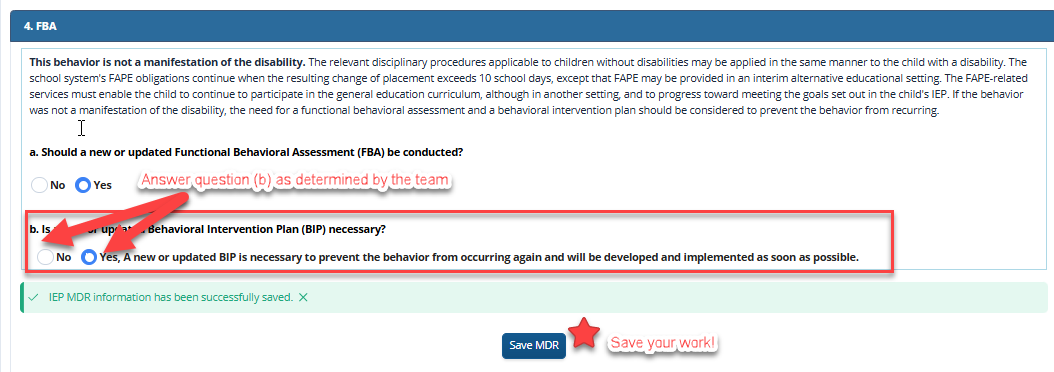
If the response to question (a) is "Yes", then additional information related to an FBA must be determined and responded to by the Team in question (b). Enter the appropriate response and then click "Save MDR".
Print MDR or Discard:
To print a PDF of the MDR, select "Print MDR" button at the top of the page. This is only available while the IEP is still "In Development".
If the MDR was started in error or if the data entered needs to be cleared (deleted), the user should select the DISCARD button.
CAUTION: selecting the DISCARD button will DELETE everything entered in the MDR and cannot be recovered!