Role Combinations
GO MTSS/SST users can be assigned one or more roles. Role assignments in GO MTSS/SST are based on the needs of the individual user. Users roles can be managed from the user list.

In order to assign a role, a school or system admin user will click on the role icon to assign or update a user's roles.
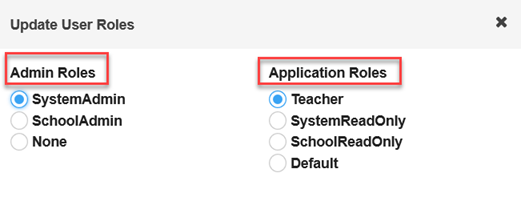
The chart below provides possible role combinations.
Valid Role Combination |
Examples of who might have this role |
GOIEP Valid Role Combinations |
View or View/Edit Students SST Record |
View or Edit Level |
Can assign a Team Lead for view/edit level |
Can set up students |
Support Tickets |
Additional Rights |
System Admin Teacher |
MTSS Director/ Coordinator; System Level Program Specialist |
System Special Education Director; System Special Education Coordinator; System Level program specialists |
View/ Edit |
All students enrolled in the system |
Yes |
Yes |
Can create and address tickets submitted to system admin; can advance tickets to state support |
Will have access to System Admin area; can manage user roles, can inactivate or exit students, can close meetings |
System Admin/Default |
MTSS Director/Coordinator; System Level Program Specialist; Administrative Assistant, SIS Contact |
System Special Education Director; System Special Education Coordinator; System Special Education Department Admin Assistant; System Level program specialists; System SIS contact |
View/ Edit |
All students enrolled in the system |
Yes |
Yes |
Can create and address tickets submitted to system admin; can advance tickets to state support |
Will have access to the System Admin Area, can manage roles, can inactivate or exit students, can close meetings |
School Admin/Teacher |
School based Leads (MTSS/SST School Coordinators, Team Leads, Chairs |
School level special education department chair; school-based special education lead teacher |
View/ Edit |
All student enrolled in the assigned schools (Note: schools assigned within the user application in GO-MTSS/SST) and any student within the system assigned as a team member |
Yes |
No |
Can create and address tickets submitted to school admins, can advance tickets to system admin |
Can manage roles for staff assigned to school(s) |
School Admin/Default |
School level chairs, leads, principals |
School level special education department chair; school-based special education lead teacher; school principal |
View/ Edit |
All students enrolled in assigned schools (Note: school assigned within the user application in GO MTSS/SST) and any student within the system assigned as a team member. |
Yes |
No |
Can create an address tickets submitted to school admin; can advance tickets to the system admin |
Can manage user roles for staff assigned to school |
No Admin/Teacher |
Teachers assigned to school; SLP, therapists and itinerant teachers assigned to single or multiple schools |
Special Education teacher assigned to school; SLP assigned to single or multiple schools; therapists assigned to single or multiple schools; itinerant teachers assigned to single or multiple |
View/ Edit |
All students assigned as a team member or team lead |
No |
No |
No |
None |
No Admin/System Read Only |
Superintendent; System Testing Coordinators |
Superintendent; System testing Coordinator |
View |
All students enrolled in the system |
No |
No |
No |
None |
No Admin/School Read Only |
School Principal; School Assistant Principal |
School Principal; School Assistant Principal |
View |
All students enrolled in the assigned schools (Note: schools assigned within the user application in GO MTSS/SST) and any student within the system assigned as a team member |
No |
No |
No |
None |
Default |
Users who have not yet been assigned a user role within GO-IEP |
Users who have not yet been assigned a user role within GO-IEP |
None |
Cannot view or edit any student information; Can complete their user profile |
No |
No |
None |
None |