LEA's Process
LEA’s Process
Screenshot of the Incarcerated Students Application
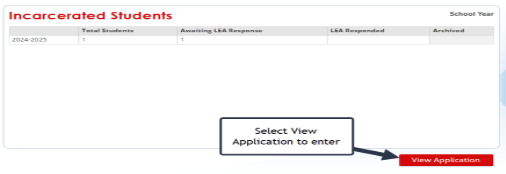
The tile will show the total count of students for the LEA, the count of students requiring an LEA response, the count of students for whom the LEA has already responded, and the count of students archived by GaDOE. the released student in Incarcerated Students application showing in the column, “Awaiting LEA Response.”
For students released from DOC, reach out to Carolyn Johnson, GA Department of Community Supervision, Reentry Services Division, 470-755-5768 or carolyn.johnson@dcs.ga.gov
If the student has signed a consent to release information, she may be able to share additional contact information for the student and may have additional knowledge about the student.
Screenshot of Released Student after selecting View Application
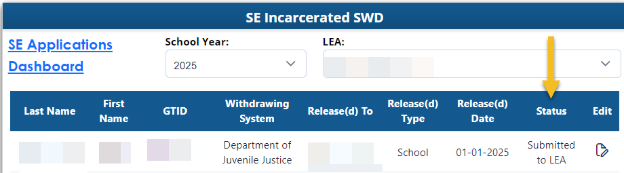
Enter the Incarcerated Students application and select edit feature at the end of the row. The LEA will select the response that best fits the student’s return.
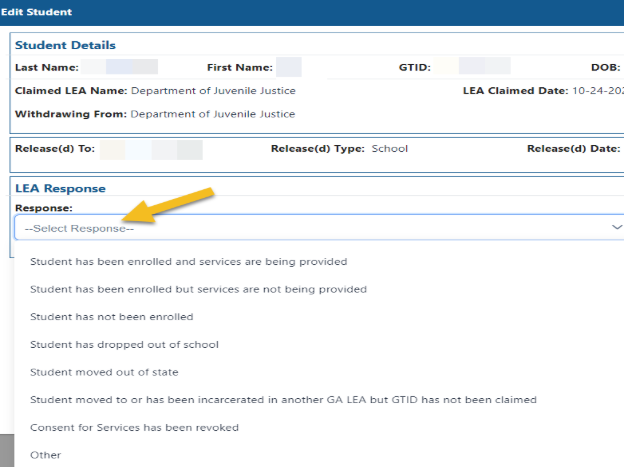
The LEAs will not be able to select a response for a student until the LEA has claimed the GTID. The Response options include:
- Student has been enrolled, and services are being provided.
- Student has been enrolled but services are not being provided.
- Student has not been enrolled.
- Student has dropped out of school
- Student moved out of state.
- Student moved to or has been incarcerated in another GA LEA, but his/her GTID has not been claimed.
- Consent for Services has been revoked.
- Enter the date and upload the revocation.
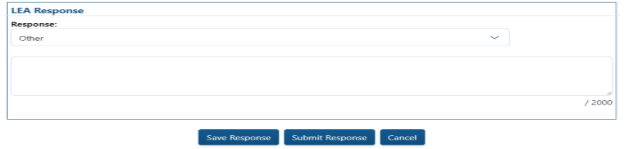
- Other (Please enter a response providing details.)
- No action was taken, and student has aged out of special education.
Screenshot of the LEA's Response Choices
Screenshot of LEA’s Response
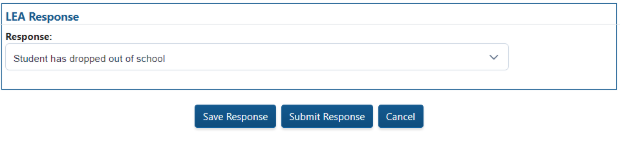
Once you have selected a response, select “Save Response” if you plan to come back to this student’s file. Select “Submit Response” if you want to complete the file.
If Consent for Services has been revoked, please upload the revocation in the application.
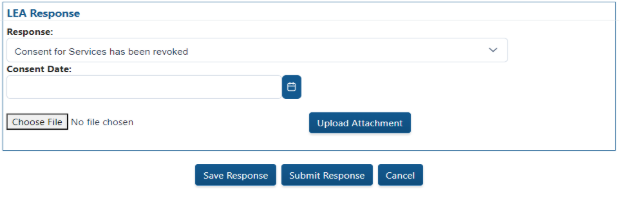
For a student with an unusual circumstance, select “Other” and enter an explanation.
The student’s status will change to “LEA Responded” once the LEA submits the response. The response will continue to be editable until the student status is Archived.

Tips for Contacting the Student
- Look in your SIS for contact information.
- Contact a prior LEA the student attended for contact information.
- Ask for assistance from the local jail.
- Ask for assistance from your social worker.
- Search social media.