DOJ/DOC's Process
DJJ/DOC's Process
Only DJJ and DOC can add students into the application by selecting the “Add Student” button and entering the student’s GTID.
Screenshot Adding a Student
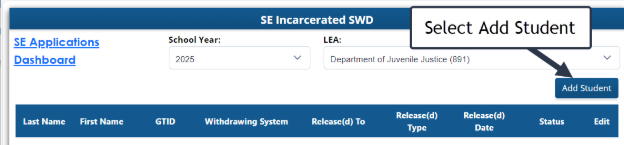
DJJ and DOC must own the GTID to enter the student in the application. If the GTID is not owned by DJJ or DOC, a message will appear, “DJJ/DOC does not currently own this GTID, please claim the GTID and then come back tomorrow to complete this.”
Screenshot of Adding a Student by GTID

Screenshot of Entered GTID

After the GTID is entered for the student, a popup box will appear showing the student’s Last Name, First Name, GTID and Birth date. If the student’s GTID is later claimed by an LEA, the fields for Claimed LEA Name and Claimed LEA Date will be displayed."
DJJ or DOC will provide the following information:
- Release(d) to (1): DJJ or DOC will select the receiving LEA using a lookup list of all GA LEAs. This should be updated by DJJ or DOC as needed.
- Release(d) type (2): DJJ or DOC will select either “Jail” or “School” depending on where the student will be released to immediately after leaving DJJ or DOC. This should be updated by DJJ or DOC as needed.
- Release(d) Date (3): DJJ or DOC will select the anticipated release date for the student. This should be updated by DJJ or DOC as needed. If the date is in the past, it should be the actual release date.
Screenshot of Adding a Student
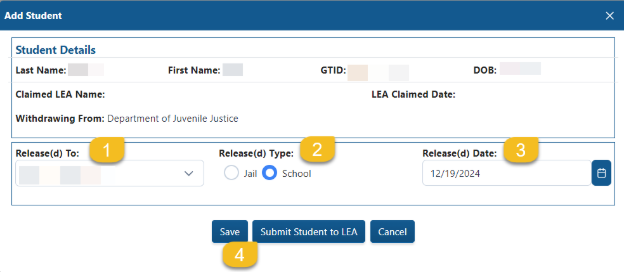
“Save” (4) may be selected if DJJ or DOC is not ready to submit or plans to return to the file to continue editing. Once DJJ or DOC completes the required information in the application and selects, “Submit Student to LEA,” the file will be shared with the appropriate LEA in their Incarcerated Student application.
A message will appear that says, “Student has been released to LEA successfully.”

After saving this data, students will appear in a cumulative list showing the status of each student.
Screenshot of DJJ’s Incarcerated Students application
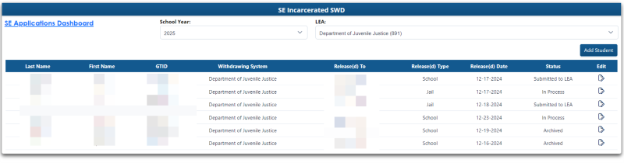
After entering the student into the application, each student will have a status.
- In Process: Entered GTID, but has not submitted the student to the LEA.
- Submitted to LEA: The student appears in LEA’s Incarcerated Student application and is available for a response.
- Archived: Students will be archived in the application by GaDOE staff after verifying that the student has been enrolled, and services are being provided, or student has dropped out of school, or student moved out of state, or Consent for Services has been revoked.
An auto-generated email will be sent to the special education director saying that a student has been added, edited, or removed from their Incarcerated Students application when
- DJJ or DOC submit the student in the application, or
- The student is later edited by DJJ or DOC.
- If a different LEA than expected claims the GTID, the “Released to” LEA will be refreshed overnight. The original LEA and the new LEA will receive an automated email.