COS Application Process
Continuation of Services Application
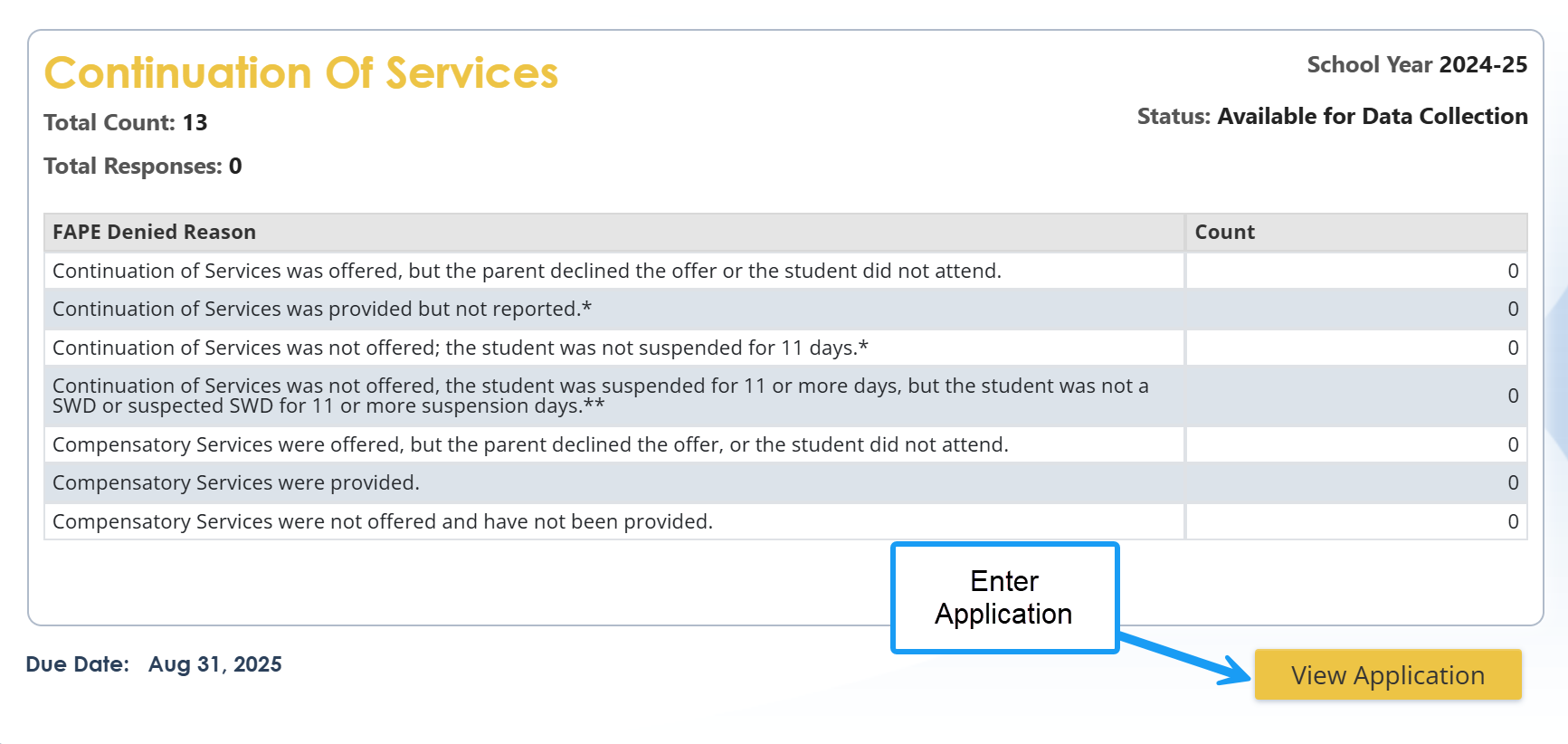
The Continuation of Services Application (shown below) is the first tile in the SE Applications. Select the View Application button to enter the Application.
Screenshot of Continuation of Services tile showing response is required
Data Verification Before Submitting Supporting Documentation
Before uploading your documentation, we recommend a thorough investigation of the situation. It is important to determine what really happened before uploading your documentation. This will include some or all of the following:
- Reading the IEP minutes from all the meetings including any Manifestation Determination Reviews (MDR).
- Reviewing the students’ attendance and discipline reports is important.
- Speaking to the case manager and/or administrator about the student’s services.
- Tracking down any communication between the LEA and Parent regarding services (i.e., letter offering services, SIS parent communication log, or FAPE documentation form)
- Locating any documentation of services such as attendance records and/or tutoring logs.
If you find discrepancies in the supporting documentation, you may need to hold an IEP meeting and offer services.
- Did the student serve all of the days assigned?
- Were the days adjusted at the IEP meeting, but not in the SIS system.
- Once it is reported in Student Record and the Superintendent signs-off that the data is accurate, changing it now won’t change what was reported. Finding inaccurate reporting may result in a loss of .5 on your timely and accurate score.
- Does the system owe the student compensatory services?
- Do you need to schedule an IEP meeting?
Investigating the discrepancies will ensure you have provided the correct services, identified any gaps in your policies, procedures and/or practices, and are aware of any potential professional learning your LEA may need before the start of the next school year.
To help prevent a lack of services from happening, LEAs should monitor their student safety reports such as DIS090, DIS095, and DIS097 throughout the year to make sure students are receiving their services and not exceeding 10 days of exclusion without continuation of services.
Entering a Response and Supporting Documentation
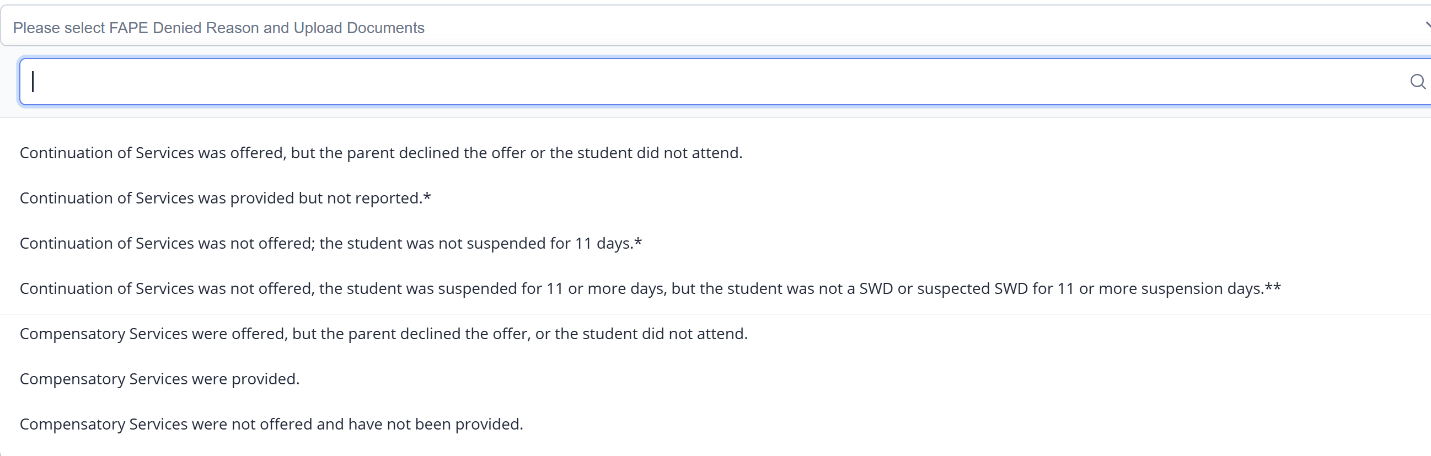
Once you have gathered all supporting documentation, enter the application, and select the ‘LEA Response to Denial of FAPE’ using the drop-down options identified in the previous section.
Screenshot of LEA Response to Denial of FAPE
Next, upload the supporting documentation gathered for the selected response (such as attendance roster for services, attendance rosters, teacher documentation) and save. It is possible to complete the process in more than one session. Make sure you select SAVE before exiting the application.
Screenshot of LEA Response and Upload Requirement

Saving the Continuation of Services Verification Report
Once the reason is selected and the documentation is uploaded, the completed students will move to the bottom of the list and appear in alphabetical order.
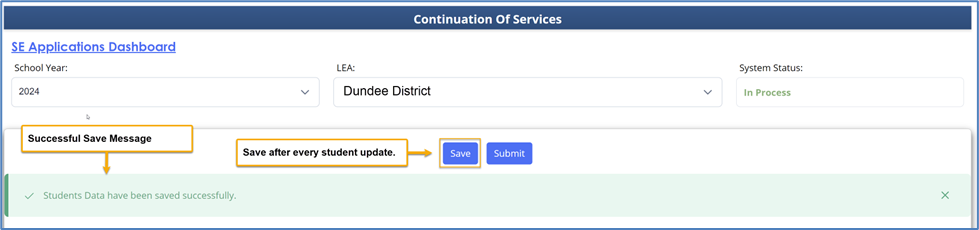
If a reason has been selected without an upload for any student, use the save button located at the top or bottom of the Continuation of Services report to save the reason. It is possible to return later to complete the supporting documentation upload.
A successful submission message will appear at the top of the page indicating that you have successfully saved your supporting documentation.
Screenshot of a successful upload
Data Submission
Select the Submit button (shown below) at the top or the bottom of the page to submit your Continuation of Services report. To be considered a timely submission, your Continuation of Services Verification Report must have an electronic date stamp no later than midnight August 31.
Screenshot of the final Submit button

Data must be reported for all students listed before you submit. The Continuation of Services Verification Report can be accessed and updated multiple times, but once submitted, the report cannot be changed without contacting the Division for Exceptional Children. If you need to correct your data prior to the deadline, enter a help ticket in the Special Education Dashboard ‘Contact State” tab to reopen your application.
Validation Checks
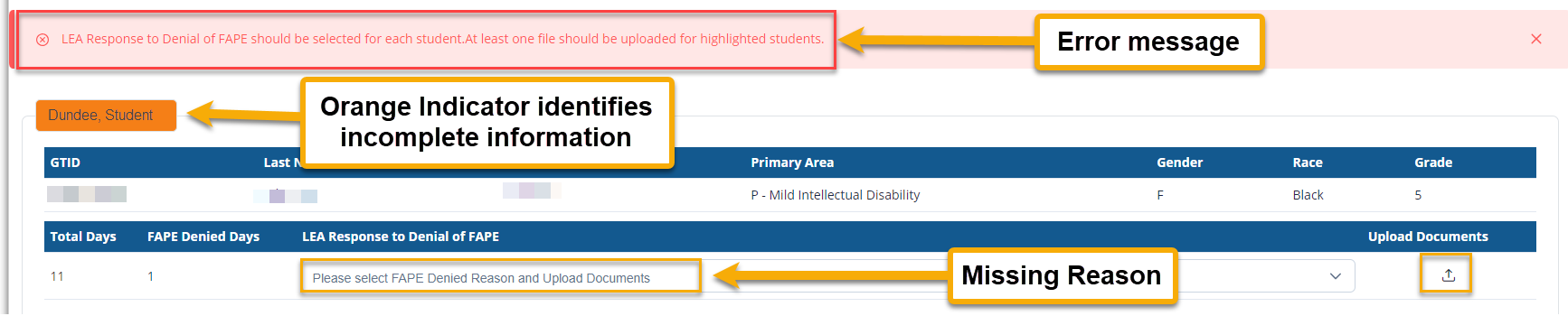
The validation below will alert you to errors in your submission. The check will alert you to the lack of an attachment and/or missing response reason for denial of FAPE. These errors must be corrected to enable submission.
Screenshot of Validation Check
After successful data submission, you will see a statement at the top of the page providing the name of the individual completing the submission and the date stamp for the submission.
Screenshot of successful submission

GaDOE Support
Support for the Continuation of Services application is available several different ways.
- Contact your District Liaison (DL) or Renita Webb at renita.webb@doe.k12.ga.us.
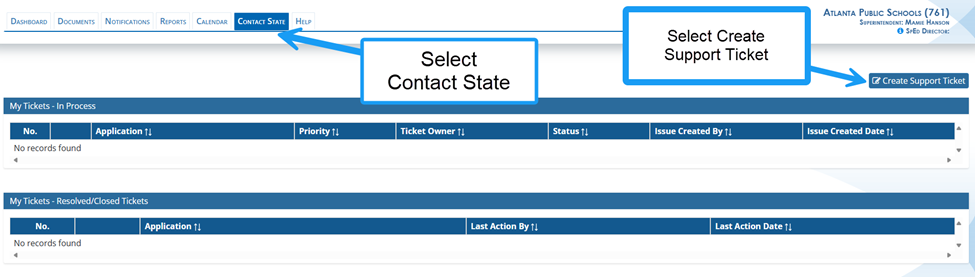
- Submit a ticket in the Contact State tab of the SE Applications. GaDOE staff will review the ticket and respond in the ticket application.
Ss Screenshot of the Support Ticket system inside of the SE Applications Dashboard
- Contact Dominique Donaldson at dominique.donaldson@doe.k12.ga.us or Carol Sprague at carol.sprague@doe.k12.ga.us if you have any questions about reporting the data. The Division for Exceptional Children will provide any technical assistance that you request to resolve these issues and prevent future noncompliance.