GAA 2.0- Eligibility Criteria
Program users will complete the Eligibility Criteria for the GAA 2.0 for every student for whom GAA 2.0 is being considered.
If GAA 2.0 is not being considered for a student, the section should not be completed. If it is started in error, use the DISCARD button at the bottom to discard the worksheet.

Step I: Review the Eligibility Criteria for GAA 2.0
There are four "Criteria" questions that MUST be selected and answered. To be eligible to participate in GAA 2.0, the answer to all four of the questions must be YES. Program users will answer the questions that appear after each link Yes or No.
As an example:
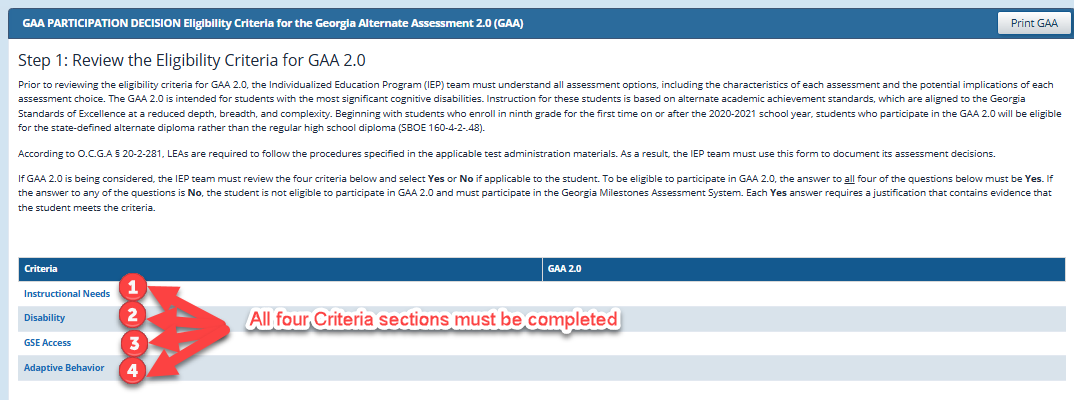
To respond to each question, click the criteria name.
The question will open allowing the user to choose Yes or No. A NO response completes the selection. Make sure to SAVE the response.
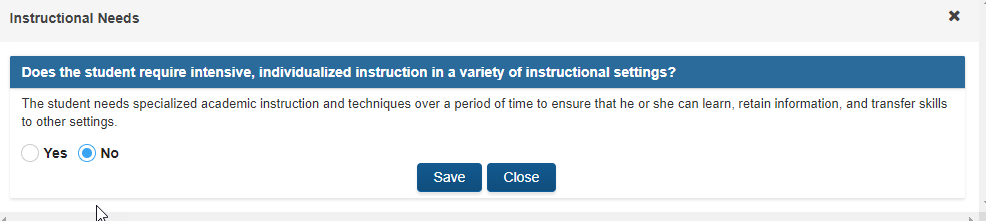
A YES response allows the user to select the sources of evidence and provide a justification. For the sources of evidence, make sure to check all that apply.
EXAMPLE:

Data from the Learner Characteristics Inventory can be used as a source of evidence by the IEP team when determining whether a student meets specific eligibility criteria for GAA 2.0 participation.
The IEP team may reference LCI results when selecting “Yes” or “No” for each criterion, ensuring decisions are informed by documented learner data.
This section is completed once all four criteria have been completed. Any question with an answer of "No" will result in the student being ineligible for participation in the GAA 2.0.

After the criteria questions are completed and saved, the answers will appear on the rubric screen. Next program users must review the Assurance Statement section and save the worksheet.
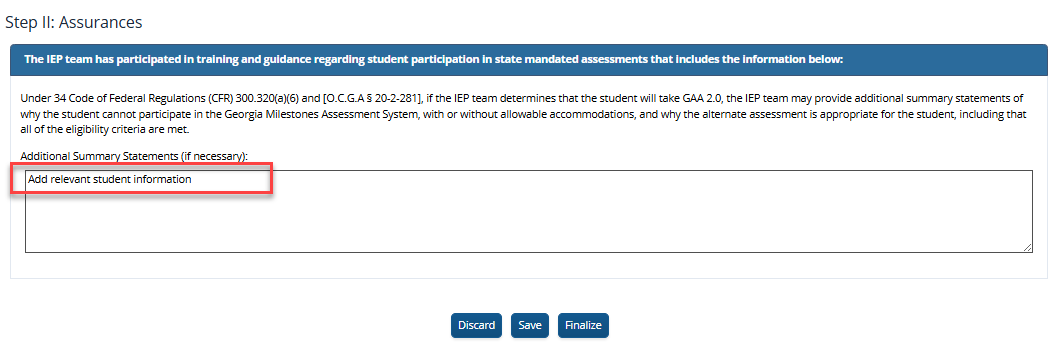
Saving the GAA 2.0 decision allows the user to come back later to update. Once the worksheet has been completed, the FINALIZE button will show if the student is eligible for participation in the GAA 2.0 or not. Please finalize a draft decision first for the meeting draft to print and then re-open following the meeting to edit if necessary based on the team decision.

The final decision will print at the bottom of the page indicating if the GAA 2.0 Decision is Complete and if the student is eligible to participate in the GAA 2.0 when grade appropriate. After finalizing a decision, the rubric can be re-opened if needed to make changes using the REOPEN button. If it was completed and not needed, DISCARD will clear the form. If a decision is NOT FINALIZED, the GAA 2.0 page will NOT PRINT in the final print.
EXAMPLE:
