Section One: Procedures for GO-IEP LEAs
Section One: Procedures for GO-IEP LEAs
GO-IEP LEAs will complete a submission process through the Special Education Applications Dashboard. Documents from GO-IEP will be automatically uploaded once the submit button is activated by the LEA. LEAs must upload all student records into the GaDOE portal by the stated deadline for Timely and Accurate Submission of Data.
Upload LEA Procedures
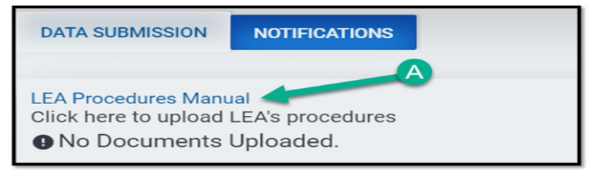
To upload the LEA Procedures Manual, select “LEA Procedure Manual” to upload LEA’s Procedures (A).”
Screenshot of LEA Procedure Manual Upload
Review/Upload Student Documents
To access student names and upload student documents select “upload documents for the following students.” The names will appear on the next screen. Select “Upload/Review Documents” (B). To select additional documents not in GO-IEP, select “Choose File” (C) then use the drop-down box to select the document name to upload (D).
Screenshot of Document Upload
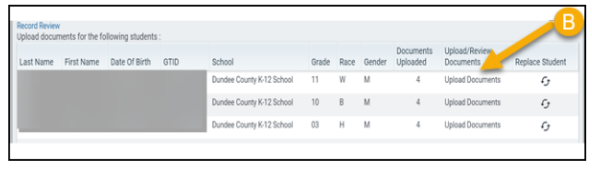
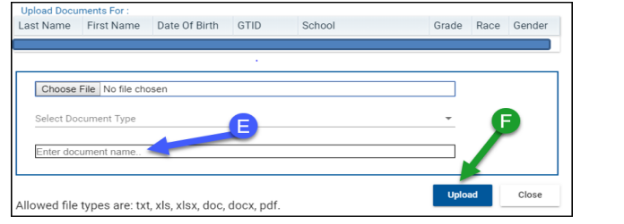
Screenshot Document Upload
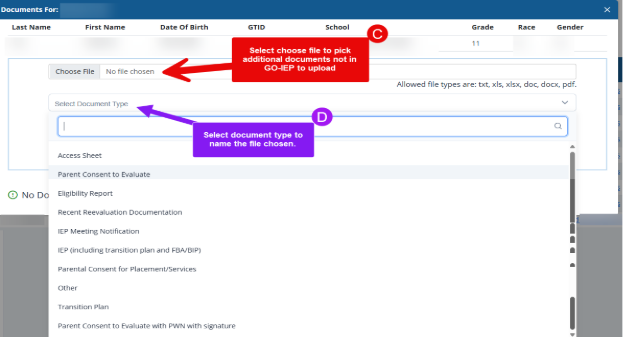
Enter the document name (E) and select “upload” (F).
Document type and upload date will be shown here (G). If more current documents need to be uploaded, you can delete the document (H) and load the new, current document.
Screenshot of Documents Uploaded & Delete

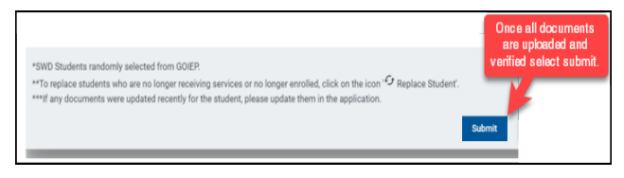
When all documents are verified and uploaded, press the submit button.