Corrective Action Plan
Corrective Action Plans
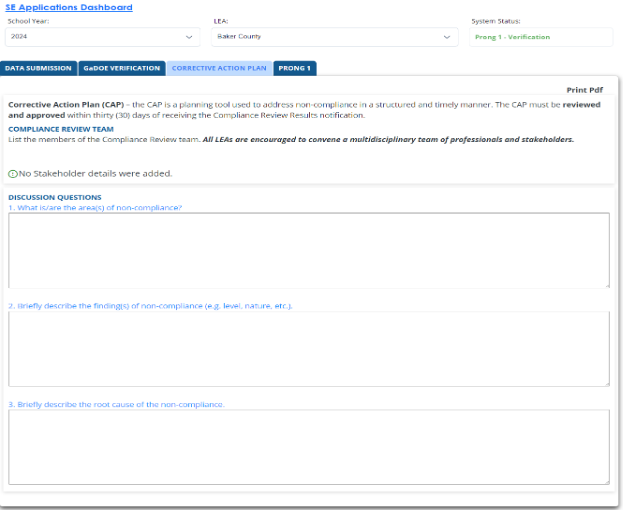
Corrective Action Plan (CAP) is a planning tool to address noncompliance in a structured and timely manner. The CAP must be reviewed and approved within (30) days of receiving the Compliance Review Results notification.
LEAs must list the members of the Compliance Review team. All LEAs are encouraged to convene a multidisciplinary team of professionals and stakeholders.
Discussion probes in the CAP must address the following questions:
- What is/are the area(s) of noncompliance?
- Briefly describe the finding(s) of noncompliance (e.g., level, nature, etc.).
- Briefly describe the root cause of the noncompliance.
Example of the Corrective Action Plan tab
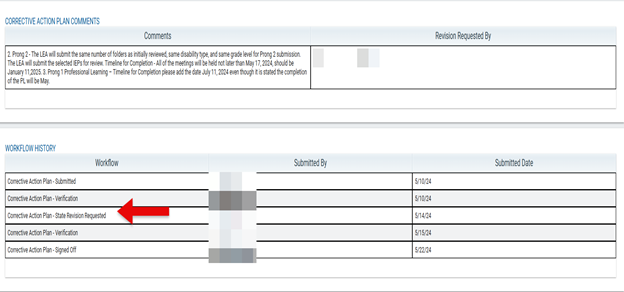
All submissions are recorded at the bottom of the corrective action plan. It includes a time and date stamp of the submissions and who submitted the information.
Screenshot of Workflow History

Screenshot Corrections Requested
Correction of Individual Noncompliance - Prong 1

Once the CAP is approved, correction of individual noncompliance (Prong 1) will populate. The LEA will need to correct each individual case of noncompliance identified on the Georgia State Rules Outline and Due Process Checklist for Student Folder Review. The LEA will have 3 months from the date the LEA received Compliance Review Results notification to complete the correction of individual noncompliance (Prong 1).
LEAs with Noncompliant Procedure Manuals
LEAs will upload:
- Corrections to areas identified as noncompliant on the Georgia State Rules Outline
- Evidence of Professional Learning (PL) related to changes in the LEA Procedure Manual
Refer to the LEA’s CAP for identified evidence. Examples of evidence might include training materials, sign-in sheets, and agendas.
LEAs who only require corrections to their Procedures Manuals will complete the CFM process in Correction of Individual Noncompliance (Prong 1).
Screenshot of Procedural Manual Uploaded

LEAs with Noncompliant Student Records
LEAs will upload
- Correction to student records identified as noncompliant in the GaDOE Verification Tab on the Cross Functional Monitoring Portal Application.
- Evidence of professional learning documents to address area(s) of noncompliance in the student record review.
- Examples of evidence might include training, documents, sign-in sheets, and agendas.
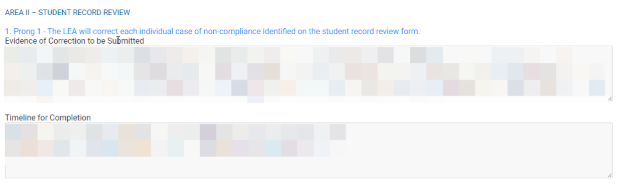
LEAs will explain the evidence submitted and the timeline for completion in the Corrective Action Tab (Area II- Student Record Review).
Screenshot of Area II: Student Record Review
Approval
The LEAs procedures and student records must be approved as part of Correction of Individual Noncompliance (Prong 1). While GaDOE is reviewing either one, the status will show as pending approval. The LEA may be required to make additional changes. If the LEA is required to make changes, then it will be reopened and editable.
Screenshot of Pending Approval

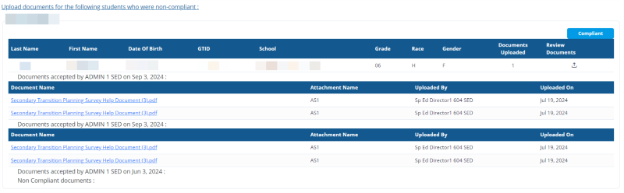
Once verified as compliant, the status will change to compliant.

Screenshot of Corrected Noncompliance - Student Files
Systemic Compliance - Prong 2
Screenshot of Prong 2 tab

Once Correction of Individual Noncompliance (Prong 1) is signed off by GaDOE staff, the Systemic Compliance (Prong 2) tab will populate in the CFM application on the Systemic Compliance (Prong 2) Student Section tab.
- LEAs will identify, select, and upload students that meet the same criteria as the original CFM selection process.
- GaDOE will not select the students for the LEA during Systemic Compliance
In systemic compliance (Prong 2) of the CFM process, LEAs upload student records created after the CFM review data that demonstrates systemic correction of areas previously found noncompliant. (Prong 2). LEAs have 9 months from notification date of CFM results to demonstrate systemic compliance.
If an LEA does not have the required number for a group of students, no additional students will be required. LEAs will need to enter an explanation as to why the LEA does not have the required number of students in the comment box. Then select, Submit.
Evidence of Compliant Student Records
The LEA will only upload documents that demonstrate systematic correction in area (s) found noncompliant, not the entire student record. The GTID number for each student selected will be needed. The individual student records submitted are new records (not previously reviewed and occurring after the CFM monitoring date) that show systemic compliance in area(s) for which noncompliance was found during the initial record review.
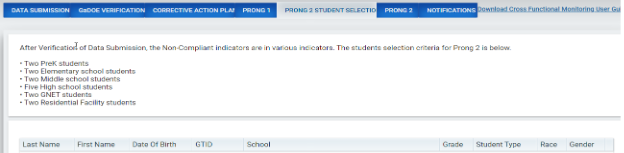
The same number of folders as initially reviewed, same disability type, and same grade level for Systemic Compliance (Prong 2) submission, if appropriate:
Two PreK students
Two Elementary students
Two Middle School students
Five High School students
Two GNETS students
Two Residential Facility students
Example of Systemic Compliance (Prong 2) Student Selection tab
Examples of Uploads
- If noncompliance is on the Eligibility Report(s), the LEA would only upload new Eligibility Reports to demonstrate systemic change.
- If noncompliance is on Present Levels of Academic and Functional Performance, the LEA would only upload the new IEPs to demonstrate systematic change.
- If noncompliance is on Transition, the LEA would only upload new IEPs with Transition Plans included to demonstrate systemic change.
- If noncompliance is on the Notice of Meeting, the LEA would upload the Notice of Meeting to demonstrate systemic change.
Screenshot of Completed Comments

In addition to the student files, LEAs must complete the Corrective Action tab: Systemic Compliance (Prong 2) Evidence of Correction to be Submitted and Timeline for Completion for submission. LEAs must enter a description of the evidence of correction and include their timeline for completion.
Example of Systemic Compliance (Prong 2) Verification in the Corrective Action Tab
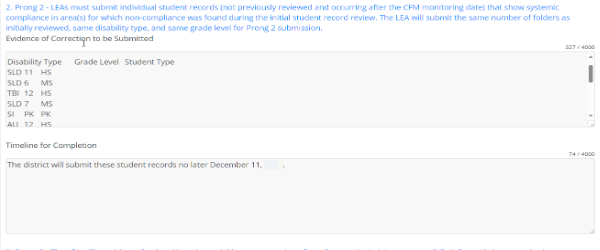
A comment box will appear if the required number of students is not selected. The LEA must explain why the required number of students has not been selected.
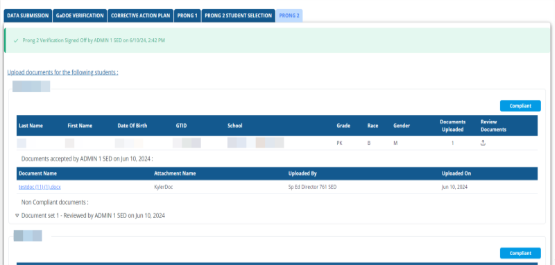
After all documents have been uploaded press submit.
If any of the files submitted are noncompliant, the LEA must correct the student file found noncompliant and upload a corrected file. The LEA will also select a new student file for review. This process will continue until all student records are rated compliant.
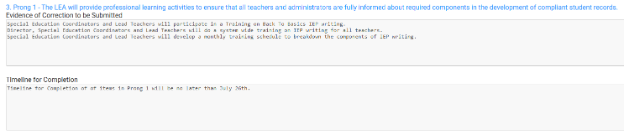
The LEA will also need to explain the professional learning activities provided, evidence of any training and the timeline for completing it. The goal is to ensure systemic compliance with the regulatory requirements in IDEA.
Screenshot of Professional Learning Activities and Timeline
Screenshot of Systemic Compliance Completed (Prong 2)
Notifications
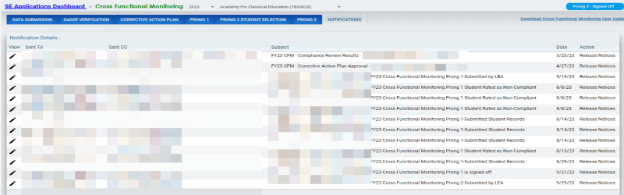
LEAs will be notified of any emails or letters regarding the CFM process in the notification tab.
Screenshot of Notification tab with correspondence
If you have questions regarding the Cross Functional Monitoring process, please contact your District Liaison.
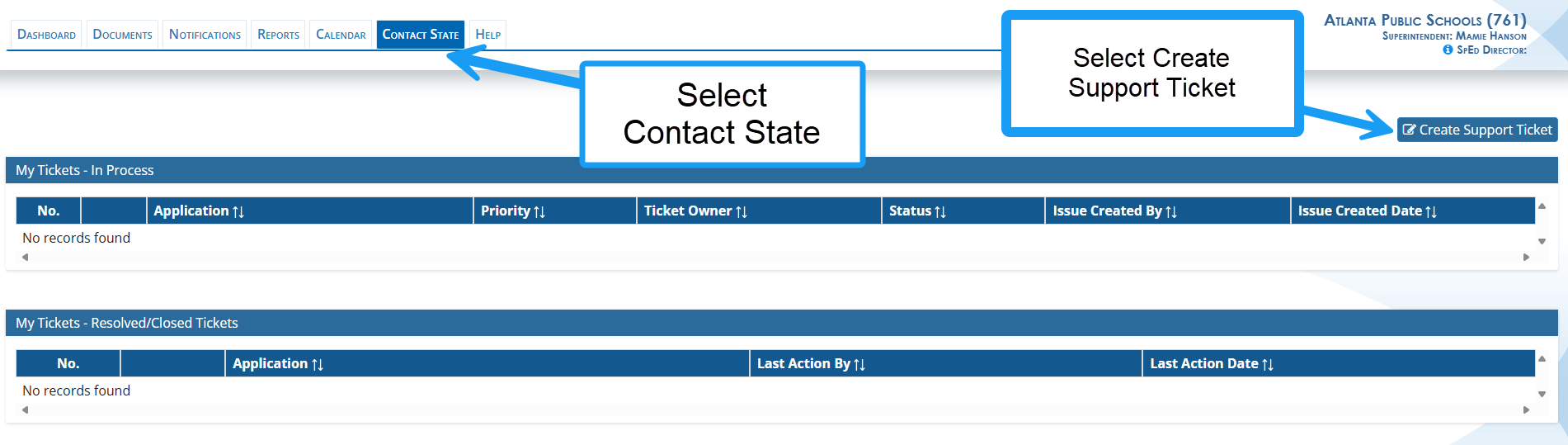
If you have questions regarding data entry in the Cross Functional Monitoring application, please submit a ticket in the SE application in the Contact State tab. GaDOE staff will review the ticket and respond in the ticket application.
LEAs may also reach out to Dominique Donaldson at dominique.donaldson@doe.k12.ga.us or Carol Sprague at carol.sprague@doe.k12.ga.us for support with submitting data in the application.